> ## Documentation Index
> Fetch the complete documentation index at: https://docs.agents.kolena.com/llms.txt
> Use this file to discover all available pages before exploring further.
# Custom Roles
> Combine Allowed Actions into Custom Roles
This is available on the Enterprise Plan. [Contact Kolena](mailto:support@kolena.com) if you’re not on an Enterprise plan but would like to try this feature.
Kolena has three [default Roles](/user-management#assign-roles) which can be applied to Users or Teams.
In some cases you may wish to define customized Roles.
Example use cases include:
* Restricting access to a true "read-only" role.
* Allowing administrative users the ability to manage billing without being able to modify Agents.
## Defining Custom Roles
Custom Roles can be defined from your [Organization page](https://agents.kolena.com/organization?tab=custom-roles).
Click "Add Custom Role" and then provide a name for the Role and select all actions which the Role will be allowed to perform.
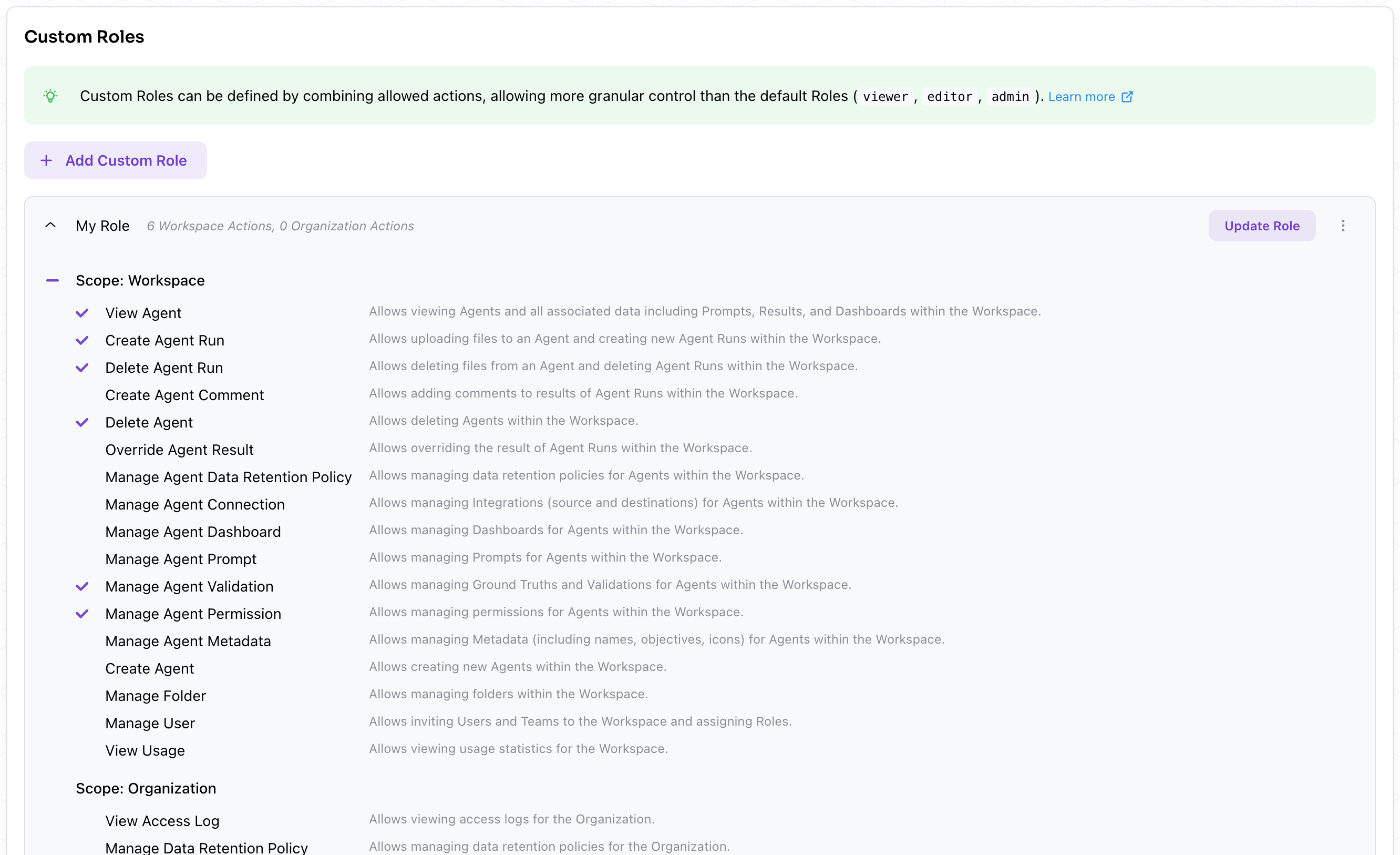 All actions have a **scope** associated to them.
This defines the extent in which the action is allowed.
Actions can be scoped to the **Organization** or to the **Workspace**.
For example:
* "Manage User" with Organization scope allows inviting new Users and controlling membership within the Organization.
* "Manage User" with Workspace scope allows modifying the Roles of all Users and Teams within the Workspace.
### Available Actions
The following actions can be assigned to Custom Roles:
| Scope | Action | Description |
| ------------ | -------------------------------------- | -------------------------------------------------------------------------------------------------------------- |
| Workspace | View Agent | Allows viewing Agents and all associated data including Prompts, Results, and Dashboards within the Workspace. |
| Workspace | Create Agent Run | Allows uploading files to an Agent and creating new Agent Runs within the Workspace. |
| Workspace | Delete Agent Run | Allows deleting files from an Agent and deleting Agent Runs within the Workspace. |
| Workspace | Create Agent Comment | Allows adding comments to results of Agent Runs within the Workspace. |
| Workspace | Delete Agent | Allows deleting Agents within the Workspace. |
| Workspace | Override Agent Result | Allows overriding the result of Agent Runs within the Workspace. |
| Workspace | Manage Agent Data Retention Policy | Allows managing data retention policies for Agents within the Workspace. |
| Workspace | Manage Agent Connections | Allows managing Integrations (source and destinations) for Agents within the Workspace. |
| Workspace | Manage Agent Dashboards | Allows managing Dashboards for Agents within the Workspace. |
| Workspace | Manage Agent Prompts | Allows managing Prompts for Agents within the Workspace. |
| Workspace | Manage Agent Permissions | Allows managing permissions for Agents within the Workspace. |
| Workspace | Manage Agent Metadata | Allows managing Metadata (including name, notes, icon) for Agents within the Workspace. |
| Workspace | Manage Agent Validation | Allows managing Ground Truths and Validations for Agents within the Workspace. |
| Workspace | Create Agent | Allows creating new Agents within the Workspace. |
| Workspace | Manage Folder | Allows managing folders within the Workspace. |
| Workspace | Manage User | Allows inviting Users and Teams to the Workspace and assigning Roles. |
| Workspace | View Usage | Allows viewing usage statistics for the Workspace. |
| Workspace | Manage Workspace Data Retention Policy | Allows managing data retention policies for the Workspace. |
| Organization | View Access Logs | Allows viewing access logs for the Organization. |
| Organization | Manage Data Retention Policy | Allows managing data retention policies for the Organization. |
| Organization | Manage IP Whitelist | Allows managing the IP whitelist for the Organization. |
| Organization | Manage User | Allows inviting Users and Teams to the Organization and assigning Roles. |
| Organization | Use API Key | Allows managing and using API keys **associated to your User** within the Organization. |
| Organization | View API Key | Allows viewing all API keys within the Organization. |
| Organization | Manage API Key | Allows creating and revoking all API keys within the Organization. |
| Organization | View Usage | Allows viewing usage statistics for the Organization. |
| Organization | Manage Usage | Allows managing usage settings (limits) for the Organization. |
## Assigning Custom Roles
Custom Roles can be assigned in all the same places as the default `viewer`, `editor`, `admin` Roles.
Custom Roles can be assigned to individual Users or to Teams.
Assignments can happen at the Organization level from the [Users tab](https://agents.kolena.com/organization?tab=users) or within individual Workspaces.
If your Organization contains multiple Workspaces, any Custom Role which implements an `Organization` scoped action must be assigned at the Organization level to a User or Team.
**Example:** Suppose you have a Custom Role named `Security Auditor` which contains the `View Access Logs` action (Organization scope) and the `View Agent` action (Workspace scope).
You should assign this role in two places:
1. To Users or Teams from the Organization Users/Teams tab *and*
2. To the same Users or Teams from each Workspace's Roles tab.
All actions have a **scope** associated to them.
This defines the extent in which the action is allowed.
Actions can be scoped to the **Organization** or to the **Workspace**.
For example:
* "Manage User" with Organization scope allows inviting new Users and controlling membership within the Organization.
* "Manage User" with Workspace scope allows modifying the Roles of all Users and Teams within the Workspace.
### Available Actions
The following actions can be assigned to Custom Roles:
| Scope | Action | Description |
| ------------ | -------------------------------------- | -------------------------------------------------------------------------------------------------------------- |
| Workspace | View Agent | Allows viewing Agents and all associated data including Prompts, Results, and Dashboards within the Workspace. |
| Workspace | Create Agent Run | Allows uploading files to an Agent and creating new Agent Runs within the Workspace. |
| Workspace | Delete Agent Run | Allows deleting files from an Agent and deleting Agent Runs within the Workspace. |
| Workspace | Create Agent Comment | Allows adding comments to results of Agent Runs within the Workspace. |
| Workspace | Delete Agent | Allows deleting Agents within the Workspace. |
| Workspace | Override Agent Result | Allows overriding the result of Agent Runs within the Workspace. |
| Workspace | Manage Agent Data Retention Policy | Allows managing data retention policies for Agents within the Workspace. |
| Workspace | Manage Agent Connections | Allows managing Integrations (source and destinations) for Agents within the Workspace. |
| Workspace | Manage Agent Dashboards | Allows managing Dashboards for Agents within the Workspace. |
| Workspace | Manage Agent Prompts | Allows managing Prompts for Agents within the Workspace. |
| Workspace | Manage Agent Permissions | Allows managing permissions for Agents within the Workspace. |
| Workspace | Manage Agent Metadata | Allows managing Metadata (including name, notes, icon) for Agents within the Workspace. |
| Workspace | Manage Agent Validation | Allows managing Ground Truths and Validations for Agents within the Workspace. |
| Workspace | Create Agent | Allows creating new Agents within the Workspace. |
| Workspace | Manage Folder | Allows managing folders within the Workspace. |
| Workspace | Manage User | Allows inviting Users and Teams to the Workspace and assigning Roles. |
| Workspace | View Usage | Allows viewing usage statistics for the Workspace. |
| Workspace | Manage Workspace Data Retention Policy | Allows managing data retention policies for the Workspace. |
| Organization | View Access Logs | Allows viewing access logs for the Organization. |
| Organization | Manage Data Retention Policy | Allows managing data retention policies for the Organization. |
| Organization | Manage IP Whitelist | Allows managing the IP whitelist for the Organization. |
| Organization | Manage User | Allows inviting Users and Teams to the Organization and assigning Roles. |
| Organization | Use API Key | Allows managing and using API keys **associated to your User** within the Organization. |
| Organization | View API Key | Allows viewing all API keys within the Organization. |
| Organization | Manage API Key | Allows creating and revoking all API keys within the Organization. |
| Organization | View Usage | Allows viewing usage statistics for the Organization. |
| Organization | Manage Usage | Allows managing usage settings (limits) for the Organization. |
## Assigning Custom Roles
Custom Roles can be assigned in all the same places as the default `viewer`, `editor`, `admin` Roles.
Custom Roles can be assigned to individual Users or to Teams.
Assignments can happen at the Organization level from the [Users tab](https://agents.kolena.com/organization?tab=users) or within individual Workspaces.
If your Organization contains multiple Workspaces, any Custom Role which implements an `Organization` scoped action must be assigned at the Organization level to a User or Team.
**Example:** Suppose you have a Custom Role named `Security Auditor` which contains the `View Access Logs` action (Organization scope) and the `View Agent` action (Workspace scope).
You should assign this role in two places:
1. To Users or Teams from the Organization Users/Teams tab *and*
2. To the same Users or Teams from each Workspace's Roles tab.