> ## Documentation Index
> Fetch the complete documentation index at: https://docs.agents.kolena.com/llms.txt
> Use this file to discover all available pages before exploring further.
# Agent-Level Access Control
> Control Agent Level Access on Kolena
This is available on the Enterprise Plan. [Contact Kolena](mailto:support@kolena.com) if you’re not on an Enterprise plan but would like to try this feature.
Access can be controlled at the Agent level.
This allows restricting access to specific Agents at a granular level, allowing specific Users or Teams `viewer` or `editor` access.
## Manage Agent Access
Starting from the main page for an Agent, the `owner`s of the Agent or Workspace `admin`s can manage access by clicking the "eye" icon near the top of the page.
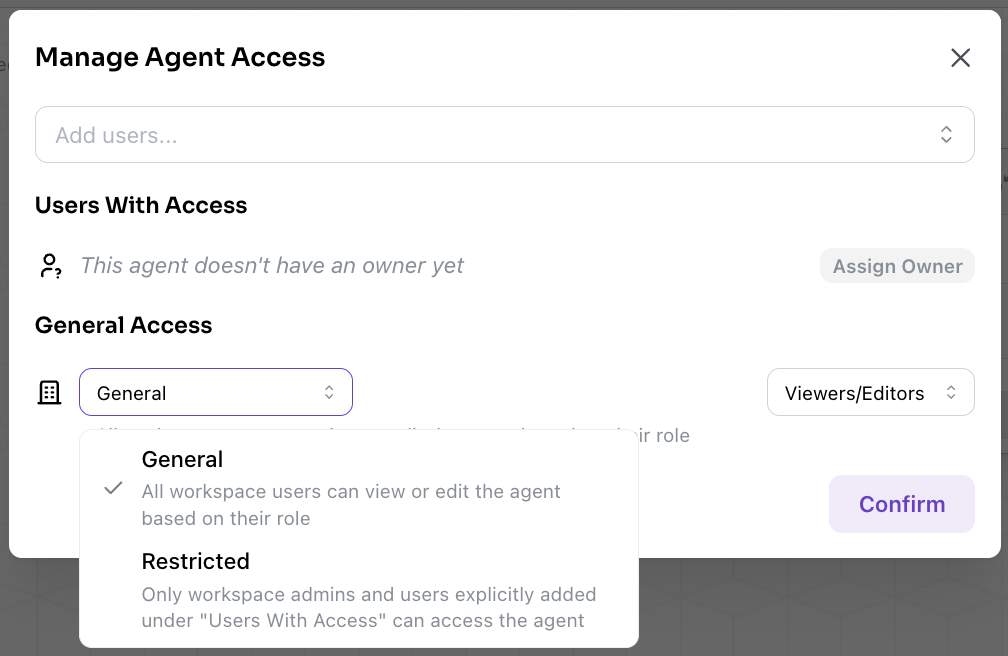 There are two access controls on an Agent.
Under **"Users With Access"**, you can explicitly add Users and Teams as `viewer`, `editor`, or assign someone as the Agent’s owner.
You can also configure the **"General Access"** setting:
* **General (View-Only)**: All Workspace users have `viewer`-only access.
* **General (Viewer/Editor)**: Workspace `viewer`s and `editor`s receive their respective roles. This is the default setting for new Agents.
* **Restricted**: Only Organization and Workspace `admins` and explicitly added Users/Teams can access the Agent.
## Agent-Level Permissions
Users with access to an Agent are assigned one of three roles: `viewer`, `editor`, or `owner`:
| Action | `viewer` | `editor` | `owner` |
| :------------------------------------------- | :------: | :------: | :-----: |
| View Agent | ✅ | ✅ | ✅ |
| View Integrations | ✅ | ✅ | ✅ |
| View Dashboards | ✅ | ✅ | ✅ |
| View Runs | ✅ | ✅ | ✅ |
| Create Runs | ✅ | ✅ | ✅ |
| Comment on Prompts results | ✅ | ✅ | ✅ |
| Override Prompts results | ✅ | ✅ | ✅ |
| Create/Modify/Delete Data Retention Policies | ❌ | ✅ | ✅ |
| Create/Modify/Delete Prompts | ❌ | ✅ | ✅ |
| Create/Modify/Delete Integrations | ❌ | ✅ | ✅ |
| Create/Modify/Delete Dashboards | ❌ | ✅ | ✅ |
| Delete Agents | ❌ | ✅ | ✅ |
| Manage Agents permissions | ❌ | ❌ | ✅ |
By default, the User who created the Agent is its `owner`, though ownership can be transferred later.
Note that Workspace `admin` Users have `owner` access to all Agents in the Workspace.
There are two access controls on an Agent.
Under **"Users With Access"**, you can explicitly add Users and Teams as `viewer`, `editor`, or assign someone as the Agent’s owner.
You can also configure the **"General Access"** setting:
* **General (View-Only)**: All Workspace users have `viewer`-only access.
* **General (Viewer/Editor)**: Workspace `viewer`s and `editor`s receive their respective roles. This is the default setting for new Agents.
* **Restricted**: Only Organization and Workspace `admins` and explicitly added Users/Teams can access the Agent.
## Agent-Level Permissions
Users with access to an Agent are assigned one of three roles: `viewer`, `editor`, or `owner`:
| Action | `viewer` | `editor` | `owner` |
| :------------------------------------------- | :------: | :------: | :-----: |
| View Agent | ✅ | ✅ | ✅ |
| View Integrations | ✅ | ✅ | ✅ |
| View Dashboards | ✅ | ✅ | ✅ |
| View Runs | ✅ | ✅ | ✅ |
| Create Runs | ✅ | ✅ | ✅ |
| Comment on Prompts results | ✅ | ✅ | ✅ |
| Override Prompts results | ✅ | ✅ | ✅ |
| Create/Modify/Delete Data Retention Policies | ❌ | ✅ | ✅ |
| Create/Modify/Delete Prompts | ❌ | ✅ | ✅ |
| Create/Modify/Delete Integrations | ❌ | ✅ | ✅ |
| Create/Modify/Delete Dashboards | ❌ | ✅ | ✅ |
| Delete Agents | ❌ | ✅ | ✅ |
| Manage Agents permissions | ❌ | ❌ | ✅ |
By default, the User who created the Agent is its `owner`, though ownership can be transferred later.
Note that Workspace `admin` Users have `owner` access to all Agents in the Workspace.