> ## Documentation Index
> Fetch the complete documentation index at: https://docs.agents.kolena.com/llms.txt
> Use this file to discover all available pages before exploring further.
# Quickstart
> Set Up Your first Agent in Minutes
## Quick Start Tutorial
Welcome to your getting-started guide for Kolena's **Agents** tool. This tutorial walks you through the steps to build your first Agent. In this example, we will create one that focuses on analyzing customer interactions.
If you'd like to follow along, the files used in the tutorial may be downloaded [here](https://kolena-public-datasets.s3.us-west-2.amazonaws.com/agents/docs/quickstart-customer-support-issues.zip).
***
### What is an Agent?
A **Agent** is an autonomous, intelligent assistant that helps you automate or enhance your processes. Agents work on your behalf to analyze documents, extract structured data, and generate insights, freeing you to focus on strategic tasks.
***
## Navigation Overview
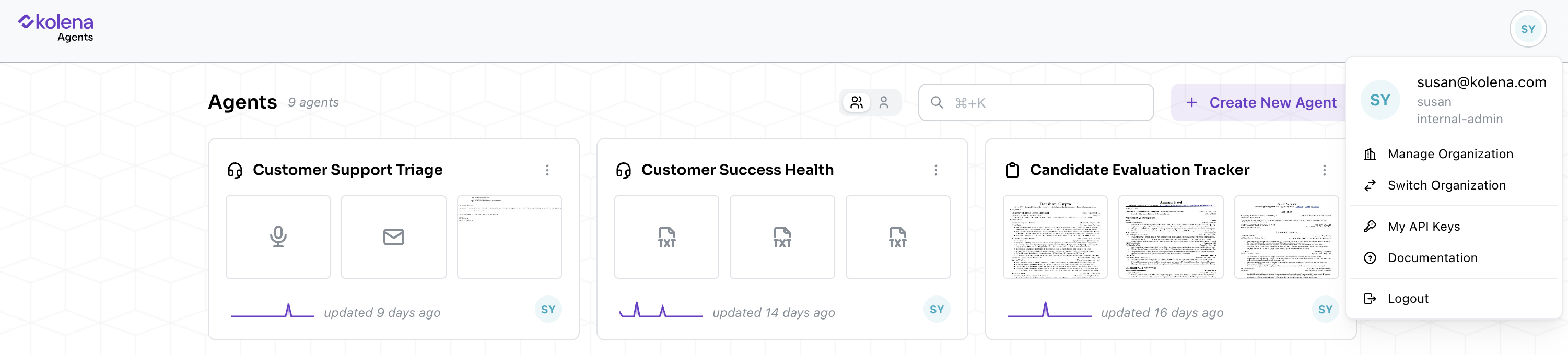 Before you start creating an Agent, explore your Organizational settings under your user profile (the menu in the top right).
Notable menu items include:
* **Manage Organization** (for admin users): Manage your Organization, users, and monthly plan.
* **Documentation**: Extensive guides on Agent setup, user management, FAQs, and prompt styling.
* **Logout**: Logs you out of the Kolena platform.
***
## Step-by-Step: Create Your First Agent
Let's walk through creating a **Customer Support Agent** to analyze customer interactions.
### Creating the Agent
Before you start creating an Agent, explore your Organizational settings under your user profile (the menu in the top right).
Notable menu items include:
* **Manage Organization** (for admin users): Manage your Organization, users, and monthly plan.
* **Documentation**: Extensive guides on Agent setup, user management, FAQs, and prompt styling.
* **Logout**: Logs you out of the Kolena platform.
***
## Step-by-Step: Create Your First Agent
Let's walk through creating a **Customer Support Agent** to analyze customer interactions.
### Creating the Agent
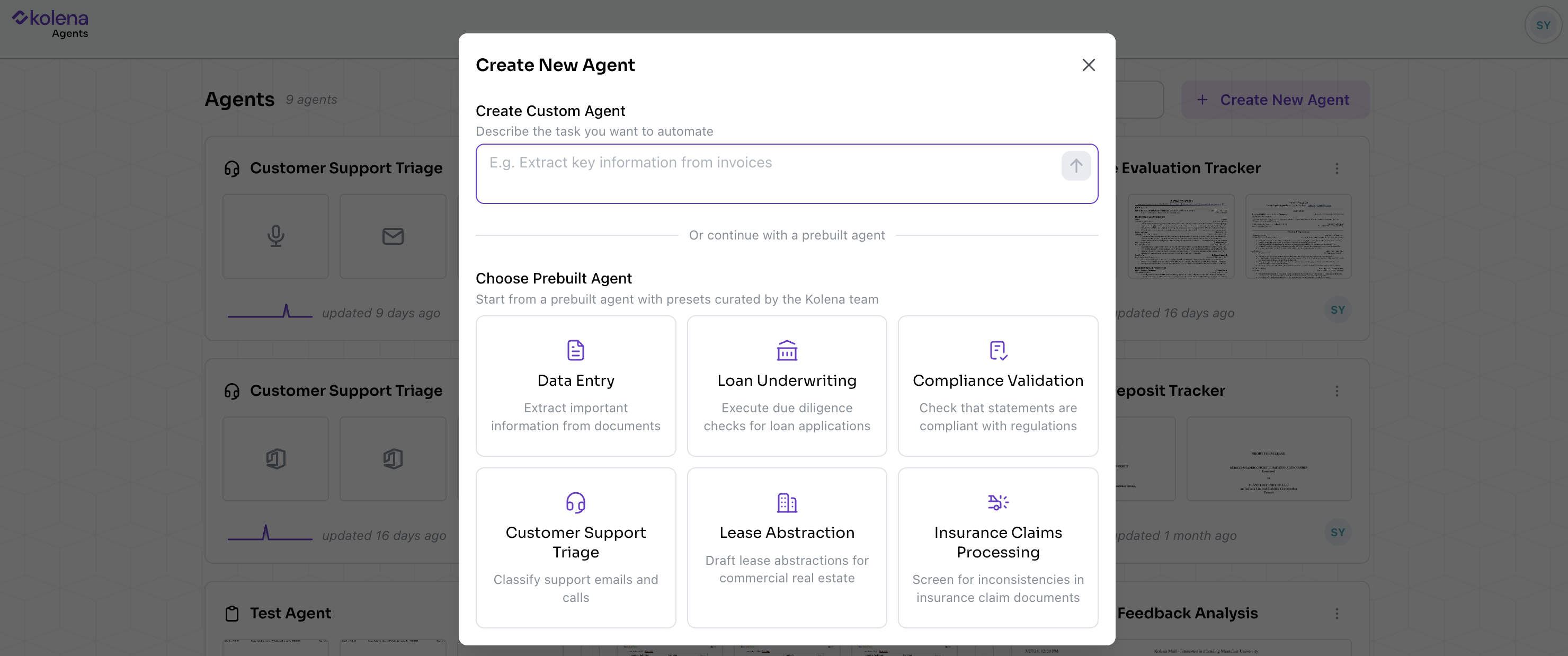 #### Option 1: Build a New Agent
* Go to your main Workspace
* Click **Create Agent**
* Define your **Objective** in your natural language
Example:
`Analyze customer interactions and behaviors`
#### Option 2: Select a Prebuilt Agent
* Go to your main Workspace
* Click **Create Agent**
* Choose from an existing prebuilt Agent option, such as: **Customer Support Triage**
### Upload an Example File
#### Option 1: Build a New Agent
* Go to your main Workspace
* Click **Create Agent**
* Define your **Objective** in your natural language
Example:
`Analyze customer interactions and behaviors`
#### Option 2: Select a Prebuilt Agent
* Go to your main Workspace
* Click **Create Agent**
* Choose from an existing prebuilt Agent option, such as: **Customer Support Triage**
### Upload an Example File
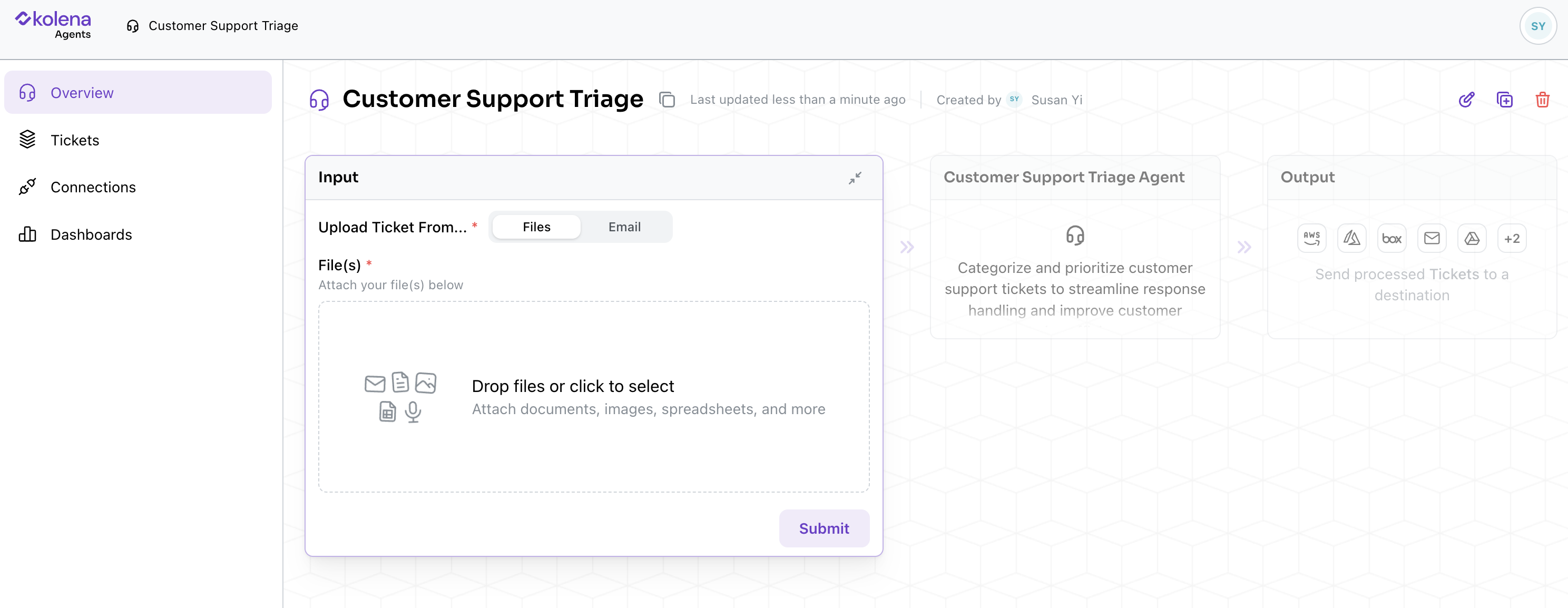 Start by uploading an example of customer interaction (email, support ticket, etc.)
* Click **Add New Support Ticket (sample file of whatever you're working with)**
* Upload a sample email or document
* Hit `Submit` to move to the prompt setup
### Prompts
Start by uploading an example of customer interaction (email, support ticket, etc.)
* Click **Add New Support Ticket (sample file of whatever you're working with)**
* Upload a sample email or document
* Hit `Submit` to move to the prompt setup
### Prompts
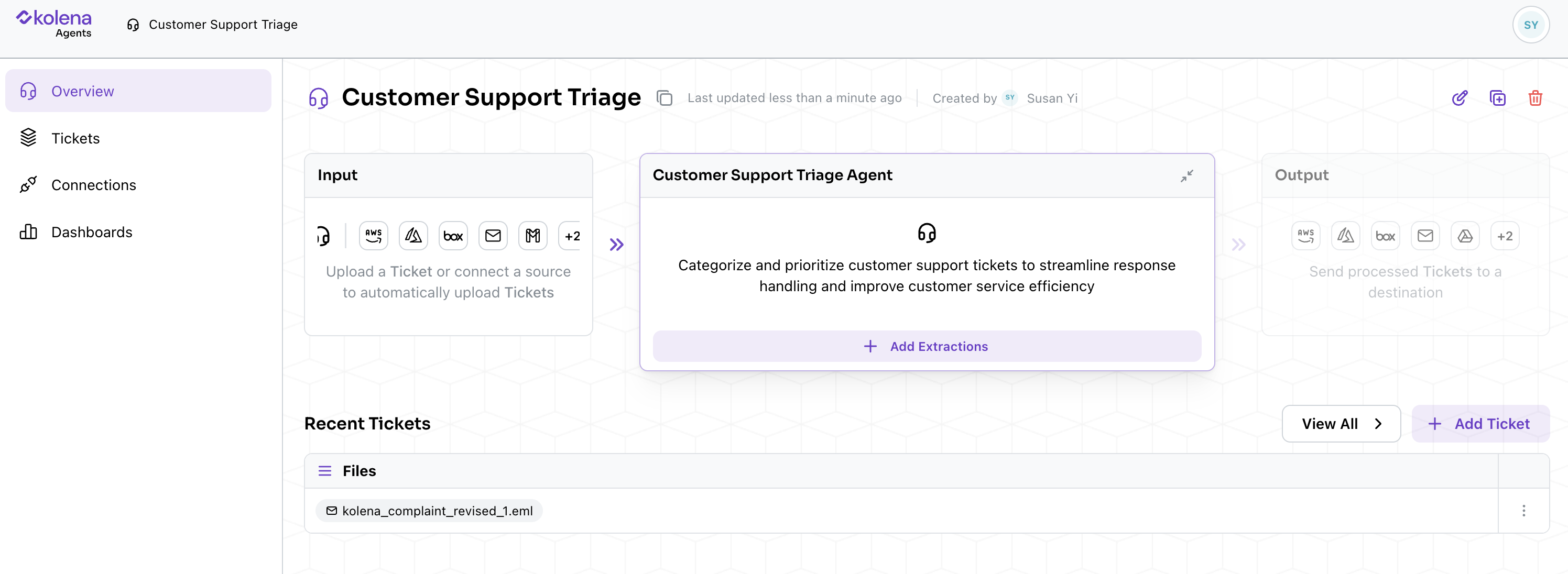 Prompts are the basic building blocks of an Agent. Think of each Prompt as an independent request to retrieve, compute, or synthesize some information from the uploaded document(s).
### Creating Prompts
Adding a Prompt is as simple as asking (in natural language) what you'd want from the AI. Kolena will intelligently use the context it has to turn that request into a prompt that precisely guides the AI into extracting the relevant information from the uploaded documents.
Once you've provided a description of what you're looking for, you can:
* Let Kolena auto-detect the output type (Create)
* Or preview the prompt, and manually adjust the instructions and output type (Preview)
Once created, Kolena will also save the Prompt to the Agent, so that future file uploads will automatically follow the same logic.
#### Customize Output Types
Prompts are the basic building blocks of an Agent. Think of each Prompt as an independent request to retrieve, compute, or synthesize some information from the uploaded document(s).
### Creating Prompts
Adding a Prompt is as simple as asking (in natural language) what you'd want from the AI. Kolena will intelligently use the context it has to turn that request into a prompt that precisely guides the AI into extracting the relevant information from the uploaded documents.
Once you've provided a description of what you're looking for, you can:
* Let Kolena auto-detect the output type (Create)
* Or preview the prompt, and manually adjust the instructions and output type (Preview)
Once created, Kolena will also save the Prompt to the Agent, so that future file uploads will automatically follow the same logic.
#### Customize Output Types
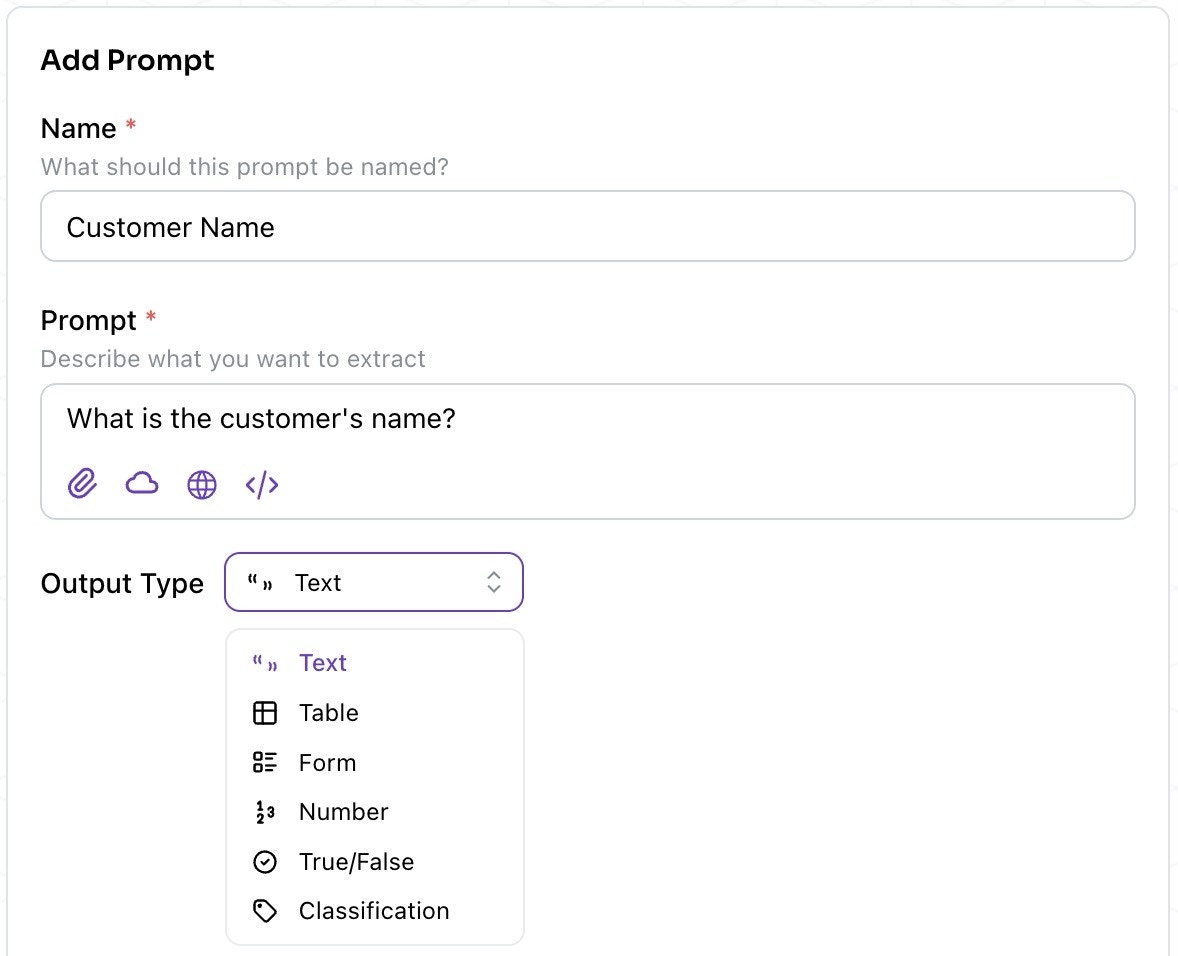 Each Prompt will also include an output type, which Kolena will match the data to when the Prompt runs.
Types Available:
* **Text** - for names, dates, signatures, formatted numbers, summaries, etc.
* **Table** - for structured data organized in rows and columns
* **Form** - for specific fields with corresponding values
* **Number** - for numerical values
* **True/False** - for boolean values
* **Classification** - for classifying into customizable categories
#### Examples of Prompts
Some useful prompts for our Customer Support Triage Agent:
* **Customer Name** (Text)
* **Issue Summary** (Text)
* **Next Steps for Resolution** (Text or Classification)
#### Advanced Options
There are a few options for more advanced prompts:
* Comparison Doc: Upload internal SOPs or guides for consistency checks
* Data Analysis: Enable if using structured Excel files or needing calculations
* Web Lookups: Pull public information as supporting context
***
## Using Your Agent
### Add More Files
Each Prompt will also include an output type, which Kolena will match the data to when the Prompt runs.
Types Available:
* **Text** - for names, dates, signatures, formatted numbers, summaries, etc.
* **Table** - for structured data organized in rows and columns
* **Form** - for specific fields with corresponding values
* **Number** - for numerical values
* **True/False** - for boolean values
* **Classification** - for classifying into customizable categories
#### Examples of Prompts
Some useful prompts for our Customer Support Triage Agent:
* **Customer Name** (Text)
* **Issue Summary** (Text)
* **Next Steps for Resolution** (Text or Classification)
#### Advanced Options
There are a few options for more advanced prompts:
* Comparison Doc: Upload internal SOPs or guides for consistency checks
* Data Analysis: Enable if using structured Excel files or needing calculations
* Web Lookups: Pull public information as supporting context
***
## Using Your Agent
### Add More Files
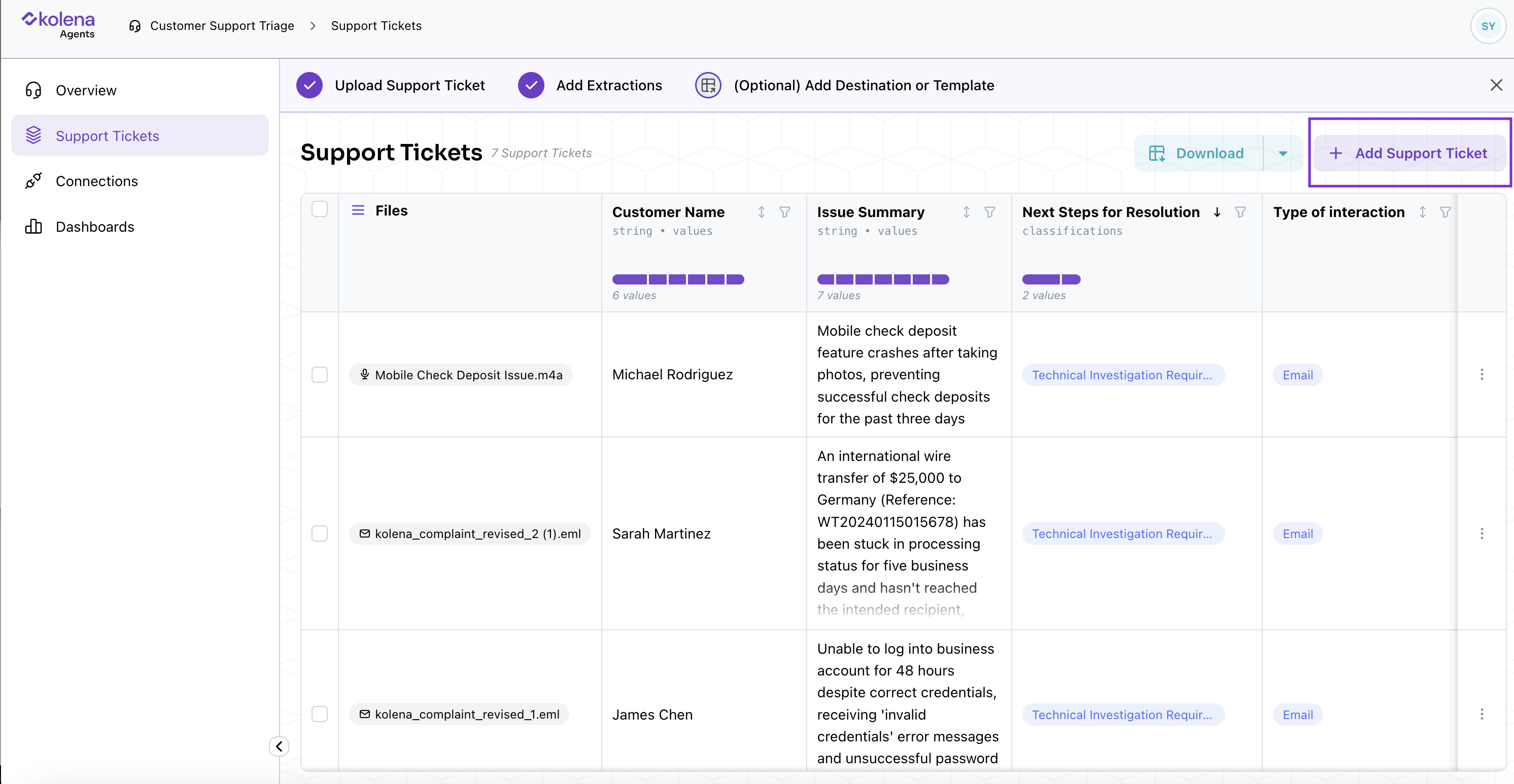 Once your Agent is ready:
* Drag and drop additional support tickets
* Choose Import as Multiple Tickets (recommended for broad analysis)
* Or Single Ticket (for deep dive into one customer's issues)
Kolena will automatically run all of the previously defined Prompts on the new files.
### Manage Your Files
Once your Agent is ready:
* Drag and drop additional support tickets
* Choose Import as Multiple Tickets (recommended for broad analysis)
* Or Single Ticket (for deep dive into one customer's issues)
Kolena will automatically run all of the previously defined Prompts on the new files.
### Manage Your Files
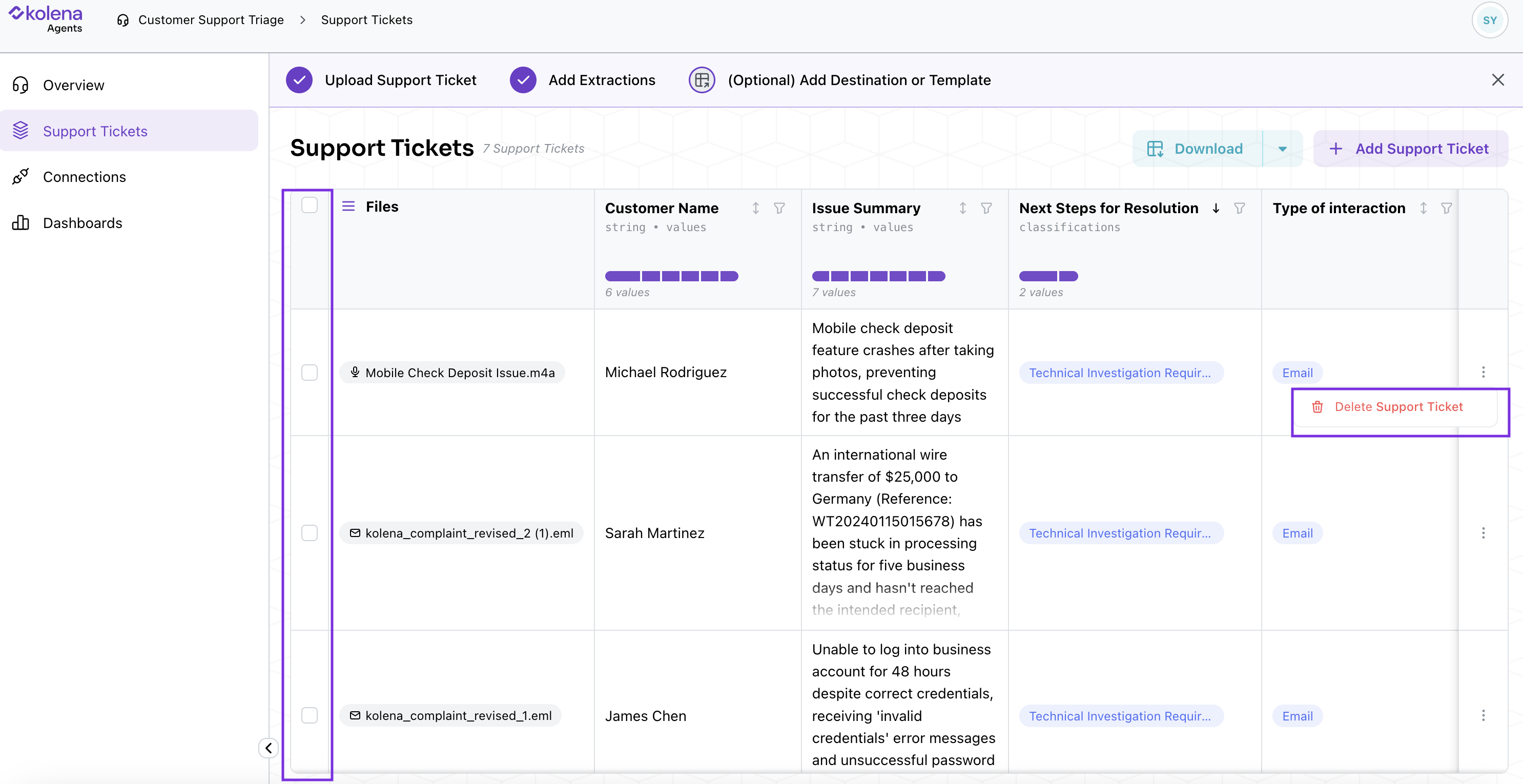 From the Agent Runs page (Support Tickets in this example), you can take further action to manage the files for your Agent:
* Delete files: Select all or specific ones to remove
* Download: Export as Excel
* Filter: By customer name, issue type, etc.
### Reporting & Collaboration
In addition to overall view provided by the Agent Runs page, you can also click into a specific Run to:
* View prompts in Editor View
* Modify or delete prompts at any time
* Use the Report View to:
* Print summaries
* Share live links
* See reasoning and citations for insights
***
## You're Ready!
You've now created a powerful Agent that can:
* Automatically parse your support tickets
* Extract key insights
* Organize customer issues and trends
* Provide structured, shareable reports
Refine your Agent over time by:
* [Integrating](/connections) your Agent to data sources or destinations
* Adding more prompts
* Uploading more examples
* Iterating on your prompts
Happy automating with Kolena!
From the Agent Runs page (Support Tickets in this example), you can take further action to manage the files for your Agent:
* Delete files: Select all or specific ones to remove
* Download: Export as Excel
* Filter: By customer name, issue type, etc.
### Reporting & Collaboration
In addition to overall view provided by the Agent Runs page, you can also click into a specific Run to:
* View prompts in Editor View
* Modify or delete prompts at any time
* Use the Report View to:
* Print summaries
* Share live links
* See reasoning and citations for insights
***
## You're Ready!
You've now created a powerful Agent that can:
* Automatically parse your support tickets
* Extract key insights
* Organize customer issues and trends
* Provide structured, shareable reports
Refine your Agent over time by:
* [Integrating](/connections) your Agent to data sources or destinations
* Adding more prompts
* Uploading more examples
* Iterating on your prompts
Happy automating with Kolena!