> ## Documentation Index
> Fetch the complete documentation index at: https://docs.agents.kolena.com/llms.txt
> Use this file to discover all available pages before exploring further.
# Workspaces
> Isolate Agents, data access, and permissions
This is available on the Enterprise Plan. [Contact Kolena](mailto:support@kolena.com) if you’re not on an Enterprise plan but would like to try this feature.
Kolena supports multiple Workspaces to separate projects or teams with your Organization.
Each Workspace is an isolated environment which can be permissioned independently.
Workspaces are helpful for use cases such as isolating development environments, or to separate different departments within a larger Organization.
## Creating Workspaces
Available Workspaces can be viewed from [your Organization page](https://agents.kolena.com/organization?tab=workspaces).
Upon request, Kolena will create additional Workspaces for your Organization.
## Manage Workspace Access
Users or Teams can be roles assigned per Workspace.
This means one user may have broad access to one Workspace, limited access to another Workspace, and no access at all to other Workspaces.
Based on the Workspace role, Users can perform the following actions, *regardless of their permission on any particular Agent* in the Workspace:
| Action | `viewer` | `editor` | `admin` |
| :--------------------------------------------------------- | :------: | :------: | :-----: |
| Create API Keys | ✅ | ✅ | ✅ |
| Create new Agents | ❌ | ✅ | ✅ |
| Create/Modify/Delete all Folders | ❌ | ✅ | ✅ |
| View all Agents | ❌ | ❌ | ✅ |
| Create/Modify/Delete Integrations on all Agents | ❌ | ❌ | ✅ |
| Create/Modify/Delete Data Retention Policies on all Agents | ❌ | ❌ | ✅ |
| Create/Modify/Delete Dashboards on all Agents | ❌ | ❌ | ✅ |
| Create/Modify/Delete Folders for all Agents | ❌ | ❌ | ✅ |
| Create/Modify/Delete Prompts on all Agents | ❌ | ❌ | ✅ |
| Create/Modify/Delete Runs on all Agents | ❌ | ❌ | ✅ |
| Manage permissions for all Agents | ❌ | ❌ | ✅ |
| Delete all Agents | ❌ | ❌ | ✅ |
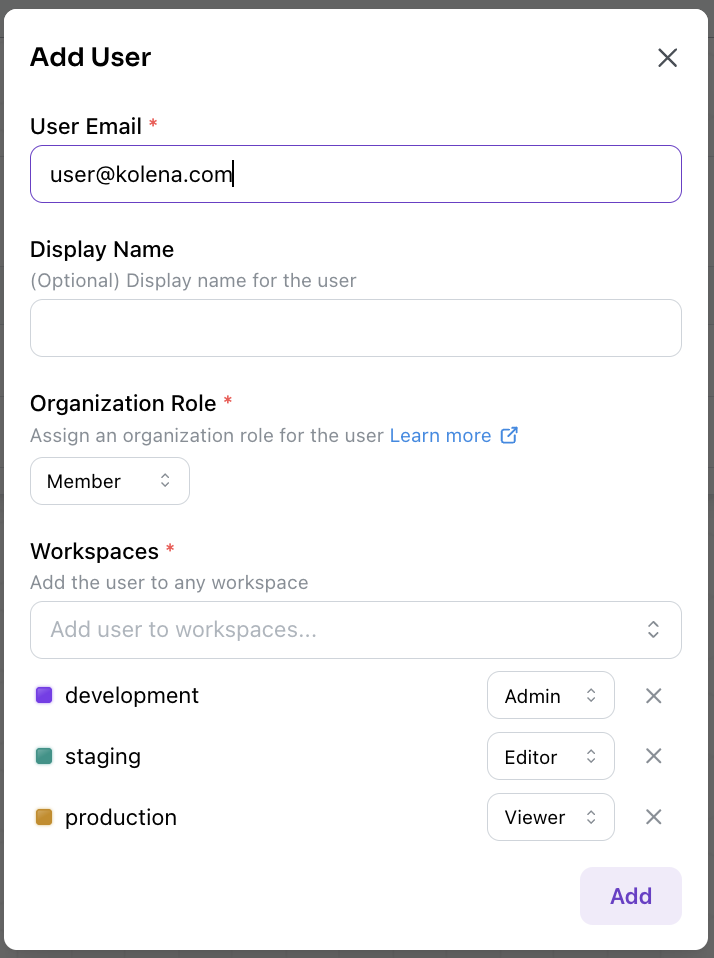
Organization `admin`s can assign Workspace roles to each User or Team when creating new Users or Teams:
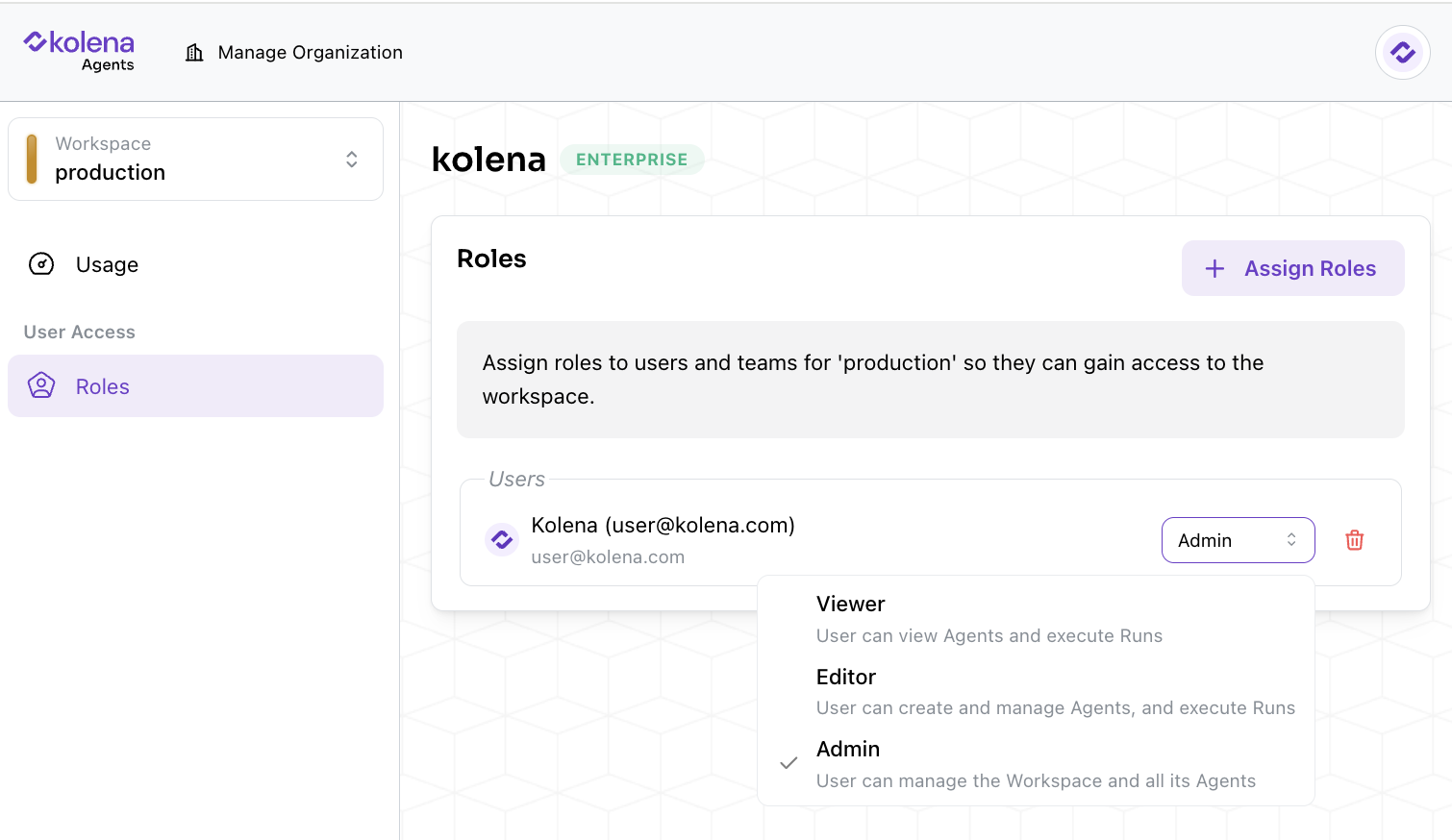
 In addition, Workspace roles may be modified by `admin`s by navigating to the "Roles" tab for each Workspace and updating the selected role.
 ### Organization vs Workspace Admins
When multiple Workspaces are present in an Organization, there are two levels of `admin` roles: Workspace `admin` and Organization `admin`.
| **Action** | **Workspace `admin`** | **Organization `admin`** |
| :-------------------------------------------------------- | :-------------------: | :----------------------: |
| Check usage by Agents in a Workspace | ✅ | ✅ |
| Manage permissions within a Workspace | ✅ | ✅ |
| Check usage by Agents in all Workspaces | ❌ | ✅ |
| Manage permissions across all Workspaces | ❌ | ✅ |
| Create or delete Users and Teams | ❌ | ✅ |
| Manage all API keys and Service Users in the Organization | ❌ | ✅ |
| Manage [Data Retention Policies](/data-retention) | ❌ | ✅ |
| Manage [SCIM Integration](/scim-setup) | ❌ | ✅ |
### Organization vs Workspace Admins
When multiple Workspaces are present in an Organization, there are two levels of `admin` roles: Workspace `admin` and Organization `admin`.
| **Action** | **Workspace `admin`** | **Organization `admin`** |
| :-------------------------------------------------------- | :-------------------: | :----------------------: |
| Check usage by Agents in a Workspace | ✅ | ✅ |
| Manage permissions within a Workspace | ✅ | ✅ |
| Check usage by Agents in all Workspaces | ❌ | ✅ |
| Manage permissions across all Workspaces | ❌ | ✅ |
| Create or delete Users and Teams | ❌ | ✅ |
| Manage all API keys and Service Users in the Organization | ❌ | ✅ |
| Manage [Data Retention Policies](/data-retention) | ❌ | ✅ |
| Manage [SCIM Integration](/scim-setup) | ❌ | ✅ |