
Output Types
Each Prompt has an output type. This type specifies the format of the response you expect. When creating a Prompt, Kolena will intelligently guess the output type based on your instructions, but you can also select the desired output type from the dropdown menu.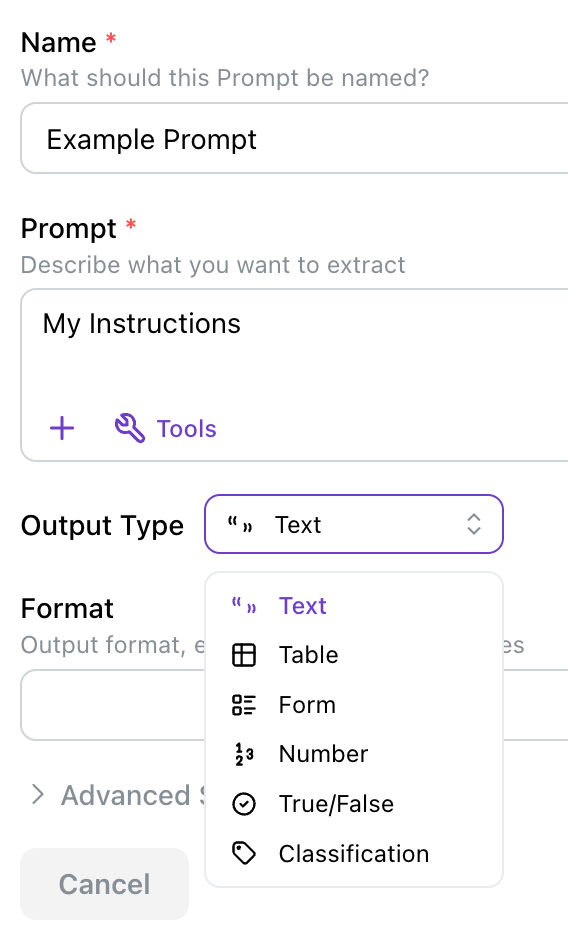
Text
Text
Text Prompts are the most flexible output type.
They allow the Agent to generate free-form text responses based on the Prompt instructions.Text output can also be formatted using Markdown syntax.
This is useful for creating structured documents with headings, lists, links, and other formatting elements.
Table
Table
Table Prompts enable structured data representation.
It is useful for extracting and organizing information in a tabular format.
When Table is selected, you must define the columns that the Agent should fill in.
Accuracy will be highest when your Prompt includes clear instructions on what data should go into each column as well as instructions for when to create a row.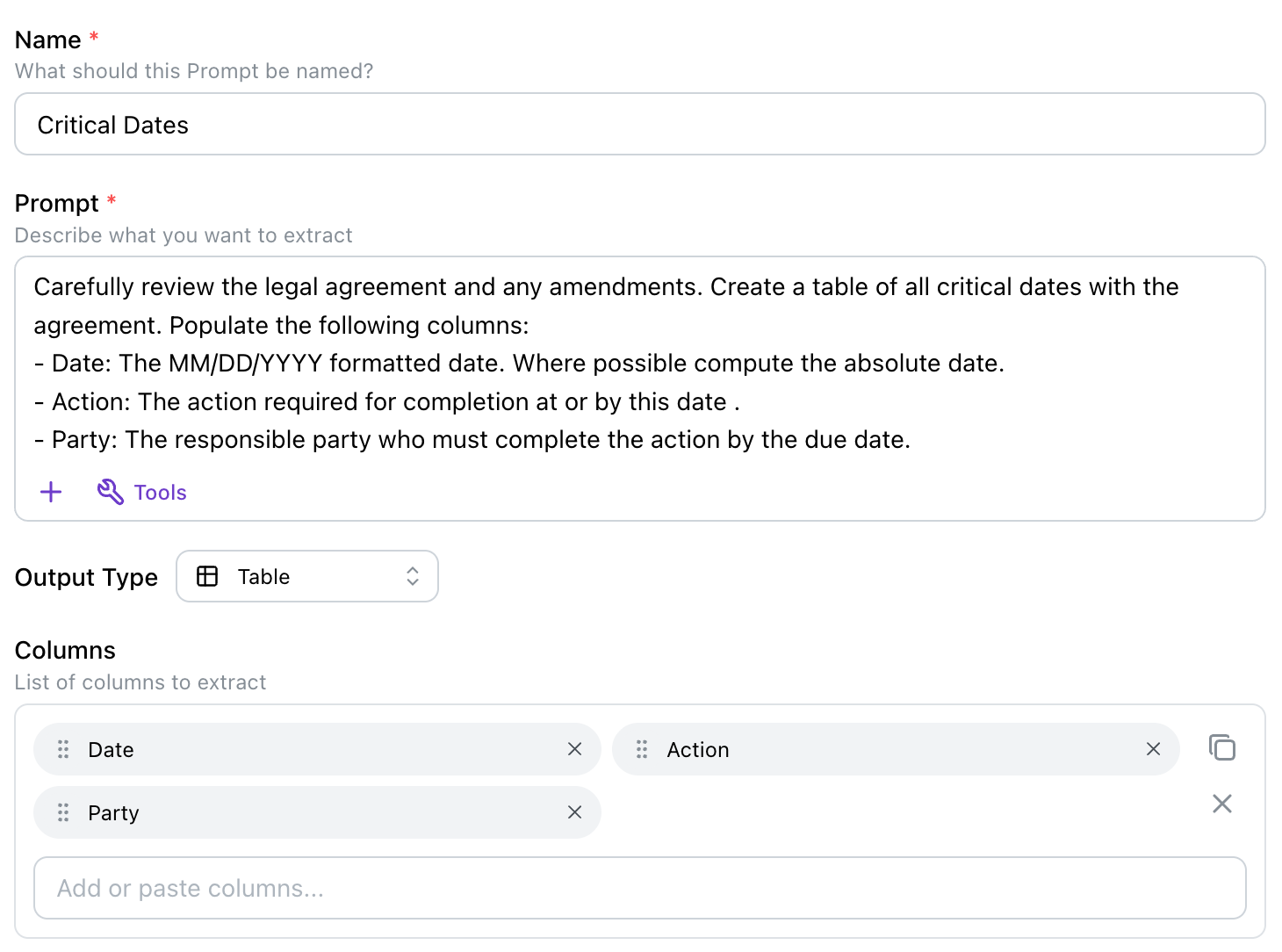
Accuracy of Table Prompts will decrease with very large (20+) numbers of columns or when each row requires many paragraphs of text to be extracted.
Recommendation: if the number of columns becomes too large, split your instruction into multiple Prompts.
Form
Form
Form Prompts return a set of predefined field/value pairs.
Each field in the Form corresponds to a specific piece of information that the Agent is expected to extract or infer.
When Form is selected, you must define the field that the Agent should fill in.
Accuracy will be highest when your Prompt includes clear instructions on what data should go into each field.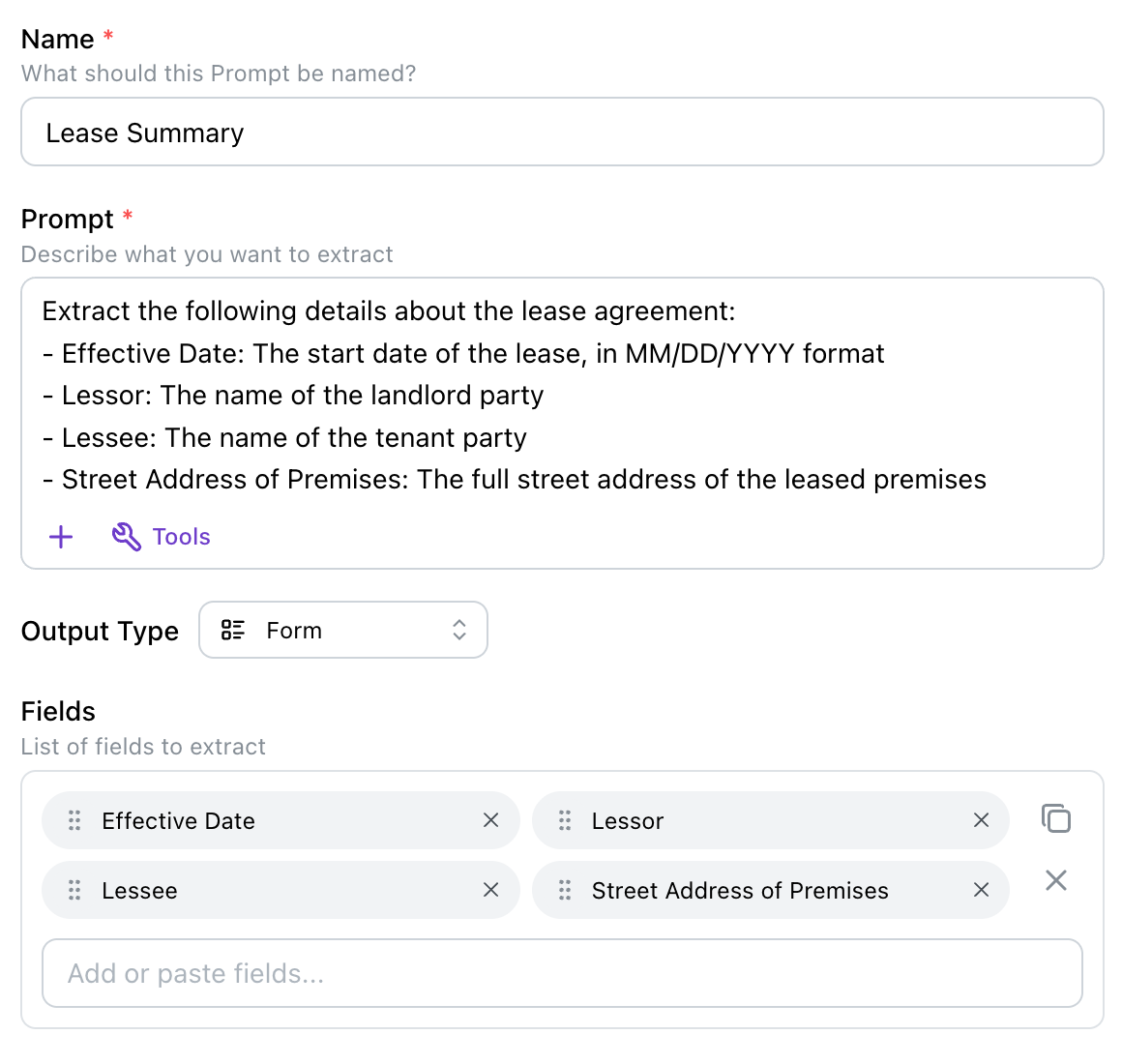
Accuracy of Form Prompts will decrease with large (20+) numbers of fields.
Recommendation: if the number of fields becomes too large, split your instruction into multiple Prompts.
Number
Number
Number Prompts should be used when the expected response is a single numeric value.
True/False (Boolean)
True/False (Boolean)
True/False (Boolean) Prompts should be used when the expected response is a true or false answer.
Classification
Classification
Classification Prompts are a special form of Text Prompt where the Agent is required to choose from a predefined set of categories.
This is useful for tasks like sentiment analysis, topic categorization, or any scenario where the response must belong to a specific set of options.
Inputs to Your Prompts
In addition to the text instructions, you can provide additional information to your Prompts using file attachments or even the results of other Prompts.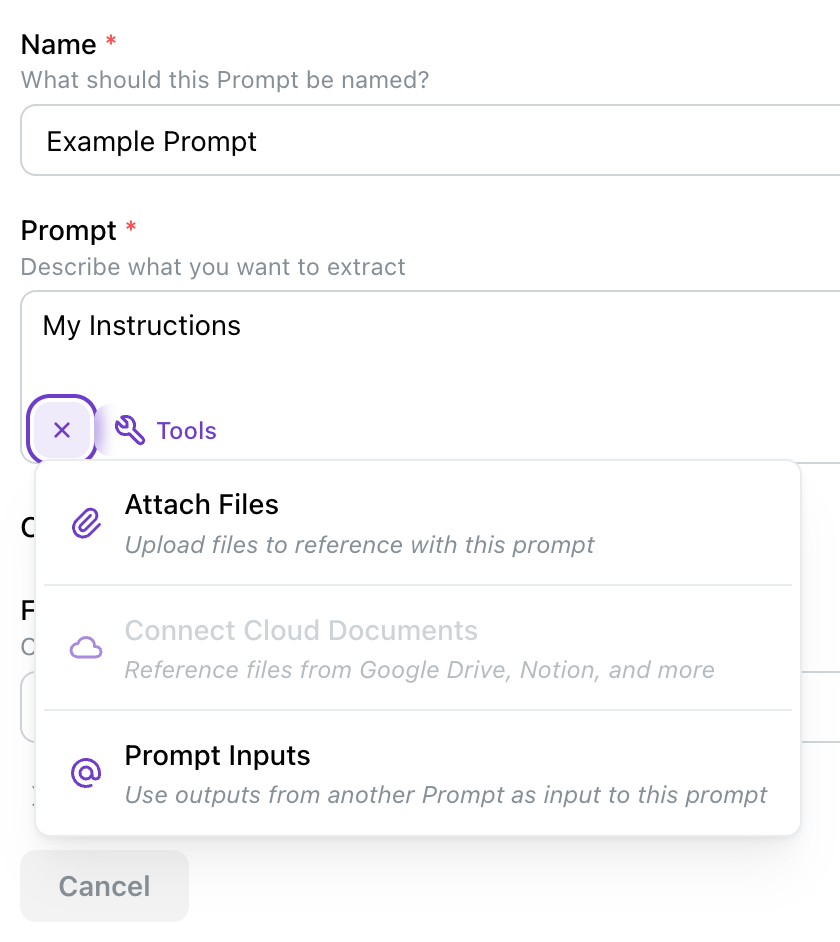
Attaching Files
Attaching a file to your Prompt allows to provide longer context that may be impractical to include directly in the Prompt instructions. You can attach files of various types including PDFs, images, spreadsheets, and more. Some examples of useful attachments include:- CSVs of lookup tables or reference data
- Guidelines or policy documents you want the Agent to follow
- Ensure the attached files are relevant to the Prompt and contain information that will help the Agent generate accurate responses.
- If the file is large or complex, provide additional instructions in the Prompt to guide the Agent on which sections to focus on.
- Use clear and concise language in your Prompt to specify how the Agent should utilize the information from the attached files.
Connecting Cloud Documents
If you wish to attach a document stored in a cloud service, you can do so by first adding an integration for that service (see Supported Integrations), then clicking that integration from the Prompt and selecting the file. Supported integrations include:- Google Drive
- Notion (KMS)
- SharePoint
Prompt Inputs (Chaining)
Sometimes a task is too complex to be handled reliably by a single Prompt. Kolena allows you to define and chain multiple Prompts together, where the output of one Prompt can serve as the input to another. This can be used in combination with other tools, for example:- Use a Table Prompt to extract structured data from a document.
- Use a Data Analysis tool-enabled Prompt to perform calculations or analysis on the extracted data.
@ when editing the Prompt text.
Tools
Advanced tools can be enabled on your Prompts to enhance their capabilities. Each tool is designed to overcome a natural limitation of state of the art AI models by leveraging specialized techniques or services.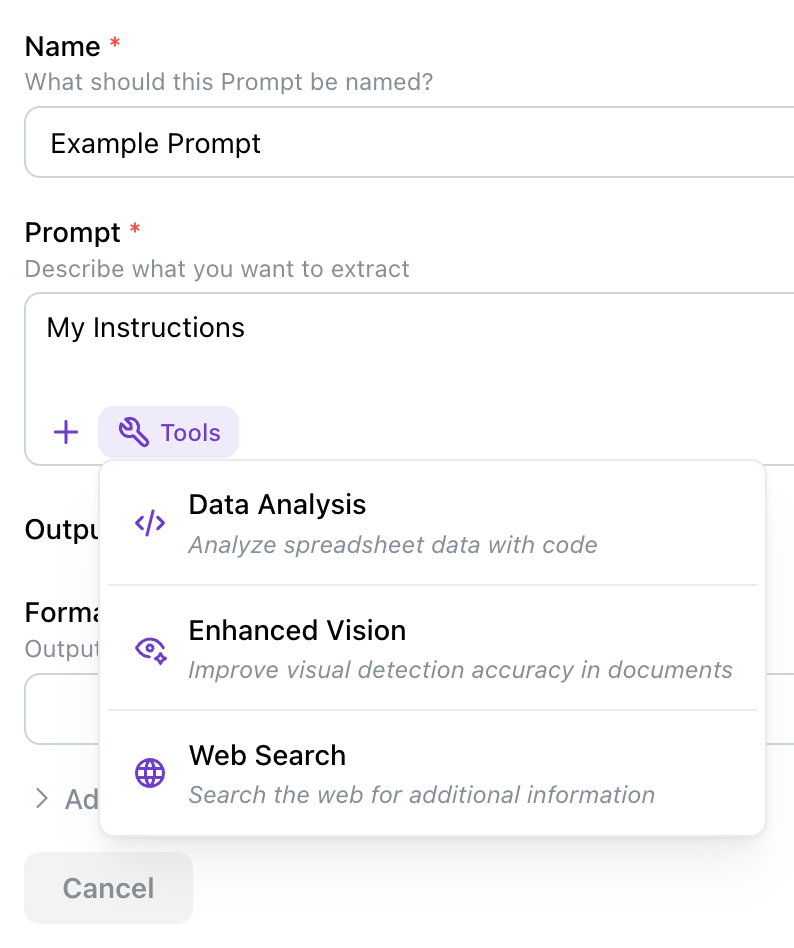
Data Analysis
Certain operations, such as mathematical calculations are best handled by specialized tools rather than relying solely on AI models’ pattern matching capabilities. Selecting Data Analysis for your Prompt will have the Agent write a piece of code which is then executed to produce the final output. This is especially powerful for tasks involving numerical data or complex calculations on tabular data. When You Should Use Data Analysis:- When you want to perform calculations, aggregations, or statistical analysis on data extracted from tabular data.
- The Agent will analyze any input document(s) and your Prompt and write a piece of code.
- This code will be executed and the results returned as the final output of the Prompt.
- When you require natural language analysis. Recommendation: perform the task using two Prompts chained together, the first to extract the data and the second to analyze it using natural language.
Enhanced Vision
State of the art AI models excel in many vision tasks. However, for a specific subset of tasks, such as accurately reading checkbox states from documents, specialized vision models will provide superior accuracy. When You Should Use Enhanced Vision:- Prompts which require correctly reading checkbox states
- The Agent will identify the regions of interest in the document or image based on your Prompt instructions.
- These regions are then processed using specialized vision models to extract the required information.
- When checkboxes exist on many pages for extraction (5+ pages)
Web Search
Web Search allows your Agents to find information from the internet to answer questions with verified references. When You Should Use Web Search:- When your Prompt requires current information from the web or verification of facts.
- When the information needed is likely to be found on publicly accessible web pages through a search engine.
- Based on your Prompt, the Agent will decide if searching the internet is necessary.
- If so, the Agent will make search engine queries to gather information and refine searches for up to 10 of the most relevant web pages.
- The Agent will extract at most 120k words and analyze the content to answer your Prompt.
- The final response will use any documents plus these search results to generate a comprehensive answer with citations.
- Web Search cannot access private or paywalled content, nor can it download files like PDFs or images.
- Web Search relies on search engine results and cannot access pages that block bots or crawlers.
Effective Web Search PromptsCraft your Prompts to steer the Agent’s search for information by:
- Asking for current information (e.g., “What are the latest developments at Kolena in 2025?” instead of “What’s Kolena doing?”)
- Using time-sensitive language like “latest,” “in the past decade,” “breaking news,” or specific time periods.
- Requesting verification and fact-checking (e.g., “Verify the current stock price of Company-Name and cite your sources.”)
- Hinting at specific sources or types of sources (e.g., “Search for information on Zillow about property prices in NYC” or “Find recent news articles about Topic-Name”)
Advanced Settings
Inline Citations
Embed file and page references directly within the output text, showing which sources were used for each part of the response. Use this when: You need to trace the source of specific information or when compliance requires detailed source attribution.Inline Citations are only available for Text, Table, and Form output types. Inline Citations are enabled by default.
Ignore Run Files
By default, when a Prompt with Input Prompts executes, two sources of information are used as input:- The files uploaded to the Run
- The results of any Input Prompts
This option is only available when Input Prompts are used.
Filter Documents (deprecated)
The recommended way to filter documents is now a dedicated Document Filter step, which you define once and connect to any number of Prompts.
This feature is unavailable when Ignore Run Files is enabled.
Control Steps
Beyond the Prompts themselves, you can add steps to your Agent that control what runs.Document Filters
A Document Filter is a dedicated step you add to your Agent that narrows down which documents your Prompts will see. It is the recommended way to control document selection: you define a filter once, write instructions describing which documents to include, and connect it to the Prompts that should receive only those documents. Connecting a Document Filter to your Prompts optimizes both extraction quality and credit usage, since each connected Prompt only processes the documents that pass the filter rather than every file in the Run. When You Should Use a Document Filter:- When a Run includes many files but only some are relevant to a given Prompt.
- When several Prompts should all operate on the same relevant subset of documents.
- When you want to reduce credits by preventing Prompts from processing irrelevant files.
- Add a Document Filter to your Agent and write instructions describing which documents to include.
- In the filter’s Input field, choose what the filter reads: All Run Files (the default) or All Run Filenames.
- In the filter’s Output field, select the Prompts that should receive the filtered documents.
- When a Run executes, the filter analyzes the Run’s documents and passes only the matching subset to each connected Prompt.
- The filter’s result is shown as the number of documents that passed out of the total (for example,
3 / 12 passed).
All Run Filenames
By default a Document Filter’s Input is All Run Files, so it reads the contents of each file. Switch the Input to All Run Filenames to filter using only the filenames, without reading file contents. It is faster and uses fewer credits.Conditionals
A Conditional is a step you add to your Agent that decides which of your Prompts run for a given Run. It works much like a Classification Prompt. You define the set of conditions it can choose from (for example,Invoice, Receipt, Other) and write instructions describing how to choose between them.
The difference is what the chosen condition does. When a Run executes, the Conditional picks the matching condition, and each Prompt you attached to that condition runs. Prompts attached to the other conditions are skipped.
Like Document Filters, this improves both extraction quality and credit usage. Each Prompt only runs where it applies, and a skipped Prompt consumes no credits.
When You Should Use a Conditional:
- When your Runs contain mixed inputs, such as different document types, and different Prompts apply to each kind.
- When a Prompt only applies in certain scenarios, such as when an optional section is present, or a review step that should only run when an earlier Prompt’s check fails.
- Add a Conditional to your Agent and write instructions describing how to choose the matching condition (for example, “Categorize the files by which company they belong to: Company A, Company B, or another company”).
- Define the Conditions the Conditional can choose from.
- Attach Prompts to conditions, either from the Conditional itself (each condition has an “If … then run …” row) or from a Prompt’s Condition field. Prompts left unattached always run.
A skipped Prompt produces no output.
If another Prompt uses a skipped Prompt as an input, it will see no value from it, so when a whole chain of Prompts belongs to one condition, attach every Prompt in the chain, not just the first.