
This is available on the Enterprise Plan. Contact Kolena if you’re not on an Enterprise plan but would like to try this feature.
Kolena has three default Roles which can be applied to Users or Teams. In some cases you may wish to define customized Roles. Example use cases include:
  • Restricting access to a true “read-only” role.
  • Allowing administrative users the ability to manage billing without being able to modify Agents.

Defining Custom Roles

Custom Roles can be defined from your Organization page. Click “Add Custom Role” and then provide a name for the Role and select all actions which the Role will be allowed to perform.
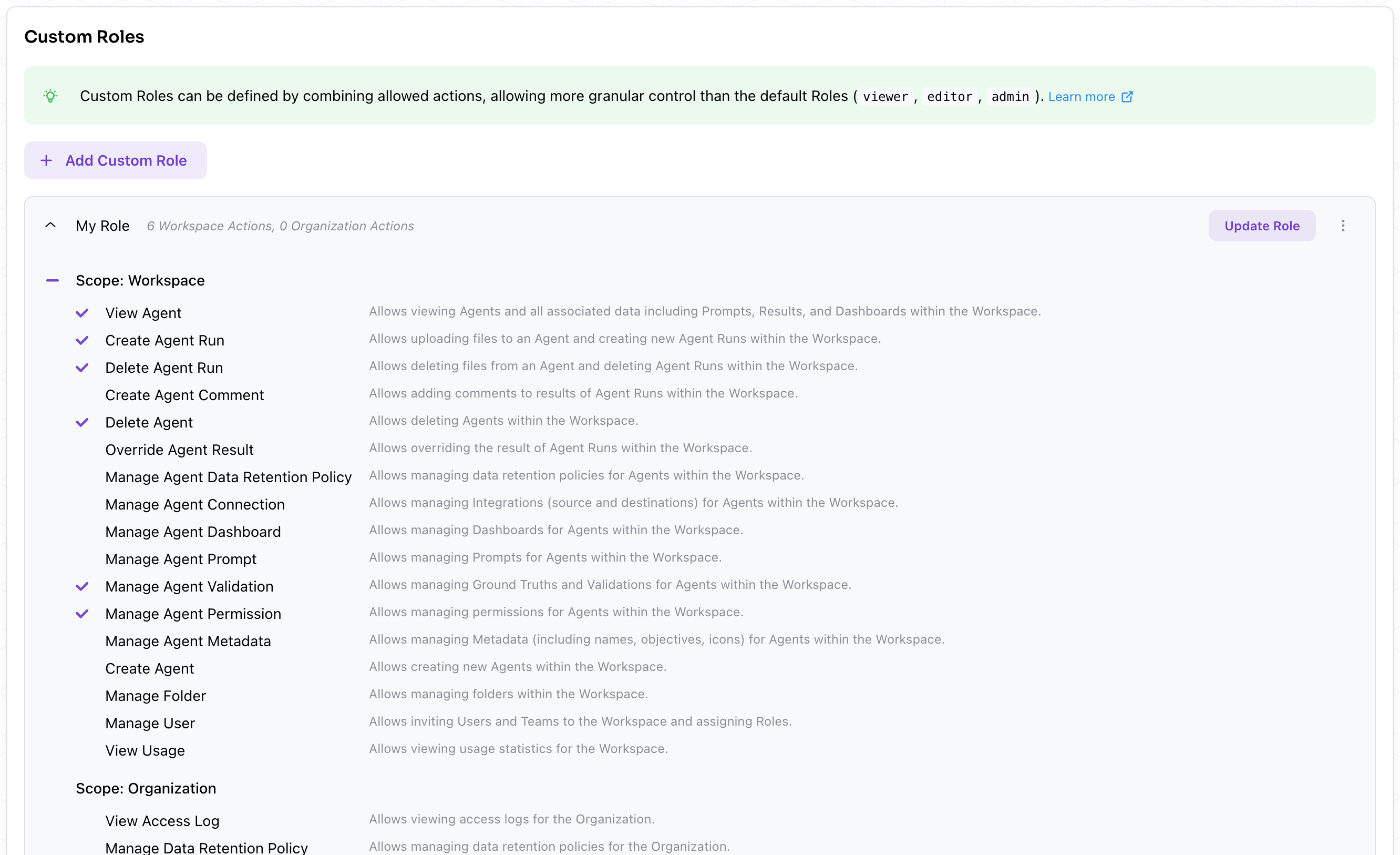
All actions have a scope associated to them. This defines the extent in which the action is allowed. Actions can be scoped to the Organization or to the Workspace. For example:
  • “Manage User” with Organization scope allows inviting new Users and controlling membership within the Organization.
  • “Manage User” with Workspace scope allows modifying the Roles of all Users and Teams within the Workspace.

Available Actions

The following actions can be assigned to Custom Roles:
ScopeActionDescription
WorkspaceView AgentAllows viewing Agents and all associated data including Prompts, Results, and Dashboards within the Workspace.
WorkspaceCreate Agent RunAllows uploading files to an Agent and creating new Agent Runs within the Workspace.
WorkspaceDelete Agent RunAllows deleting files from an Agent and deleting Agent Runs within the Workspace.
WorkspaceCreate Agent CommentAllows adding comments to results of Agent Runs within the Workspace.
WorkspaceDelete AgentAllows deleting Agents within the Workspace.
WorkspaceOverride Agent ResultAllows overriding the result of Agent Runs within the Workspace.
WorkspaceManage Agent Data Retention PolicyAllows managing data retention policies for Agents within the Workspace.
WorkspaceManage Agent ConnectionsAllows managing Integrations (source and destinations) for Agents within the Workspace.
WorkspaceManage Agent DashboardsAllows managing Dashboards for Agents within the Workspace.
WorkspaceManage Agent PromptsAllows managing Prompts for Agents within the Workspace.
WorkspaceManage Agent PermissionsAllows managing permissions for Agents within the Workspace.
WorkspaceManage Agent MetadataAllows managing Metadata (names, objectives, icons) for Agents within the Workspace.
WorkspaceCreate AgentAllows creating new Agents within the Workspace.
WorkspaceManage FolderAllows managing folders within the Workspace.
WorkspaceManage UserAllows inviting Users and Teams to the Workspace and assigning Roles.
WorkspaceView UsageAllows viewing usage statistics for the Workspace.
OrganizationView Access LogsAllows viewing access logs for the Organization.
OrganizationManage Data Retention PolicyAllows managing data retention policies for the Organization.
OrganizationManage IP WhitelistAllows managing the IP whitelist for the Organization.
OrganizationManage UserAllows inviting Users and Teams to the Organization and assigning Roles.
OrganizationUse API KeyAllows managing and using API keys associated to your User within the Organization.
OrganizationView API KeyAllows viewing all API keys within the Organization.
OrganizationManage API KeyAllows creating and revoking all API keys within the Organization.
OrganizationView UsageAllows viewing usage statistics for the Organization.
OrganizationManage UsageAllows managing usage settings (limits) for the Organization.

Assigning Custom Roles

Custom Roles can be assigned in all the same places as the default viewer, editor, admin Roles. Custom Roles can be assigned to individual Users or to Teams. Assignments can happen at the Organization level from the Users tab or within individual Workspaces.
If your Organization contains multiple Workspaces, any Custom Role which implements an Organization scoped action must be assigned at the Organization level to a User or Team.Example: Suppose you have a Custom Role named Security Auditor which contains the View Access Logs action (Organization scope) and the View Agent action (Workspace scope). You should assign this role in two places:
  1. To Users or Teams from the Organization Users/Teams tab and
  2. To the same Users or Teams from each Workspace’s Roles tab.